The HASA & Orenda Calculator®
Test, Balance, and Perfect Your Pool Water — All in One Place.
Our Pool Chemical Calculator
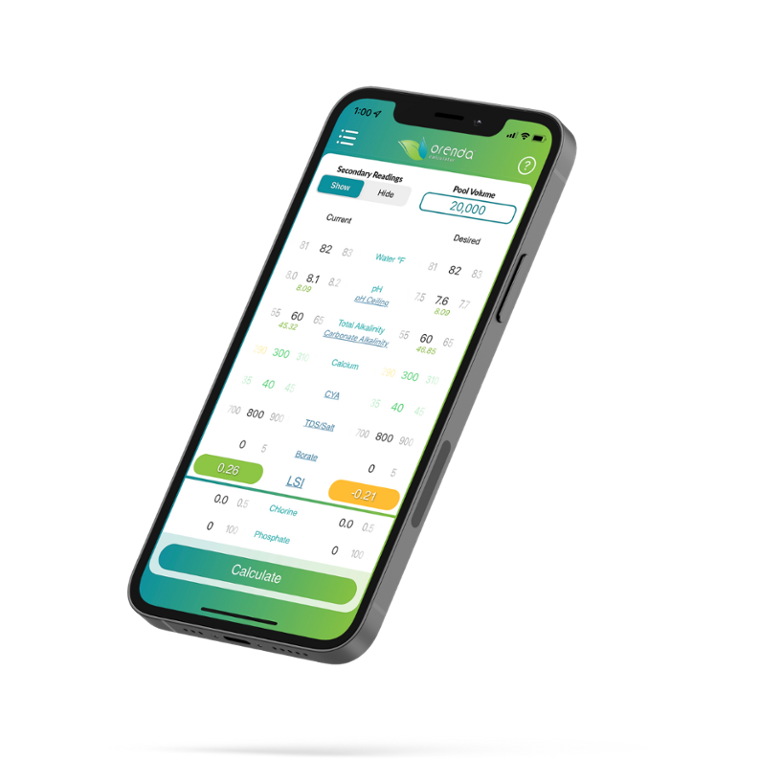
The Orenda Calculator® is your go-to pool chemical calculator for achieving perfectly balanced water. Designed for professionals and homeowners alike, it simplifies how you test and treat your pool—calculating precise LSI scores, pool water volume, and chemical doses with every input.
A pool chemical calculator requires careful input of volume and test results, and the accuracy of any dosing recommendation depends entirely on how precise that water data is.
If you’ve ever wondered how to use a pool chemical calculator, this tool makes it easy: just start with testing your water, enter the readings you measure for free chlorine, pH, cyanuric acid, and total alkalinity, and view instant recommendations to optimize clarity, comfort, and safety.
Developed by Orenda Technologies, now part of the HASA family, the calculator reflects our shared commitment to science-based, sustainable water care. Whether you’re adjusting chlorine levels for the ideal 2-4 ppm or fine-tuning alkalinity toward 80 - 120 ppm, it also helps keep pH at 7.4–7.6 and stabilizer at 30–50 ppm for a given amount. It’s your smart LSI calculator for pools—now available directly on HASA.com. Use the embedded calculator below to get started.
The Orenda Calculator®:
The colors of the LSI in Pool Chemistry
Wondering how to use a pool chemical calculator? It's color coded for easy use. At the bottom of it, the LSI number can be four different colors. From high-LSI to low:
- (≥ +0.31) PURPLE means your water is over-saturated with Calcium carbonate (CaCO3). This is scale-forming water. The water must reject some calcium (precipitate it out) to get back down into LSI balance.
- (0.00 to +0.30) GREEN is the ideal LSI balance. Water is perfectly happy with how much calcium carbonate it has in the current conditions.
- (-0.30 to -0.01) YELLOW is acceptable, and close enough for the water to be happy. While green is ideal, yellow is okay. Just understand the pH will naturally rise, so depending on your pH ceiling, the LSI is likely to rise from yellow into the green, or even purple.
- (≤ -0.31) RED is aggressive water that is hungry for calcium. It tends to etch cement, damage vinyl liners and fiberglass, and harm plaster and pool equipment. Calcium hardness is commonly maintained around 200-400 ppm to help prevent these aggressive water conditions. The lower the value, the worse! This water is starving for calcium and will try to find it where it can.
For the most accurate results, select “Custom” settings at the top left—this allows you to type in your exact pool readings instead of using the dials.
This LSI calculator for pools will instantly display your water’s balance, ideal adjustment levels, and estimated pool water volume, helping you achieve perfectly clear, comfortable, and well-maintained water every time.
Click inside and enter your numbers!
Want to understand LSI in more depth? Read What Is the LSI in Pool Water?
How To Use Our Pool Chemical Calculator:
Pool water chemistry involves balancing free chlorine, pH, cyanuric acid, total alkalinity, and calcium hardness. For the most accurate results, have your current test readings ready — especially free chlorine, pH, total alkalinity, and calcium hardness — and enter your pool volume as accurately as possible. The more accurate the numbers you enter, the more accurate the calculator’s recommendations will be.
New to pool chemistry? Start with our "Mastering Pool Water Chemistry guide" for pool owners and pool professionals alike.
Choosing Your Input Method
At the top left, select whether you prefer dials or custom inputs (tap and type in your values).
Inputting Pool Volume
At the top right, input gallons of the pool
-
The left side is your current water chemistry. Test your water and adjust each factor.
-
The right side is your desired water chemistry. Each number can be adjusted the same way as the left side.
- The goal is to adjust the right side to a green or yellow LSI value while paying attention to the pH ceiling. The pH will naturally rise to this ceiling eventually (without chemical automation). Try to contain pH so that when the pH rises to its ceiling, the LSI is still balanced in the green, not purple.
- Be sure your right side (desired water chemistry) is realistic, based on your current water chemistry. For example, having low calcium hardness with high alkalinity is much more difficult than basing your strategy on higher calcium hardness and lower alkalinity.
- Everything that is underlined can be tapped to learn more information about that item. We strongly recommend tapping each item to learn what it means.
-
When the right side has an LSI value that works for you, tap Calculate at the bottom.
Viewing Dosage Recommendations
The dosing results page shows the chemicals required to get from where your water is (the left side, current readings) to where you want your water to be (the right side, desired readings).- Muriatic acid or sodium bisulfate for lowering pH
- Stabilizer products
- Soda ash for raising pH
- Sodium bicarbonate for raising alkalinity
- Calcium chloride for calcium hardness
- Chlorine forms like tablets, cal hypo, or sodium hypochlorite.
After adding chemicals, follow label directions, add products in the proper order, keep circulation running, and retest after the water has had time to mix thoroughly. Ready to treat your water? Find HASA products near you →
No results showing? This usually means the left side was adjusted last, which synced the right side dial to match it, so there's no difference between the dials, and no result shows on the dosing page. See our help article, (The Orenda Calculator® Will Not Show Chemical Doses. What's Wrong?), for more. Exact dosages may vary by product, so consult manufacturer instructions, confirm each dose, and keep chemical records.
Master Pool Chemistry and Avoid Costly Mistakes With Our Guide
-
Learn the ideal pH, alkalinity and calcium hardness ranges.
- Master solutions to common pool problems
- Get practical safety and compliance tips
- Discover practice to improve efficiency and reduce costs
Innovation in Water Treatment Chemistry
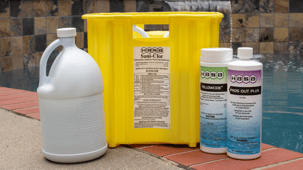
In 2023, HASA and Orenda Technologies joined forces to advance the science of clean, balanced water. Together, we’re redefining what it means to maintain water purity—combining HASA’s trusted liquid sanitizers, including sodium hypochlorite, a common product for pool sanitation, and sustainable packaging systems with Orenda’s data-driven approach to pool chemistry and digital tools like the Orenda Calculator®. HASA's liquid chlorine contains 12.5% sodium hypochlorite. It does not add cyanuric acid, is effective against bacteria and algae, and is widely used in pool shock treatments.
Our shared mission is to simplify water care for every user—from pool professionals and facility operators to municipalities and homeowners. By uniting proven chemical formulas with smart technology, we empower people to make precise, responsible water treatment decisions that protect equipment, extend water life, and create safer, healthier environments for everyone.
Today, innovation at HASA isn’t just about the products we make—it’s about the knowledge, tools, and chemistry insights we provide to help you manage water with confidence and care. We offer tools and guidance for safe, clean and clear water treatment.
Download the Orenda app & calculator